A first cut from one sentence
Ask for a 12-minute cut that keeps the story and drops the tangents. Selects watches all of the footage, builds the draft on a real timeline, and takes your notes from there.
Two hours of footage.
Twelve good minutes.
Drop in the whole shoot and say what the video is about.
Selects cuts the story, places the B-roll, and uploads it when you're happy.
Free plan, no credit card required
Prompt: Use this channel's cold open structure. Five seconds of build before the first word, end on READY?
Prompt: I don't have a drone shot. Make one of the coastline for the intro, then land on the waterfall
Prompt: Make the captions pop word by word, I talk fast in this one
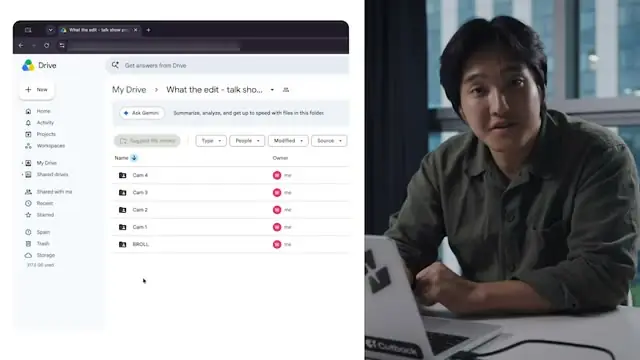
A 12-minute video is two hours of footage, and all of it gets watched back at least once: the takes, the tangents, the B-roll you forgot you shot. Then come the cuts, the pauses, the captions and the shorts to promote it.
That is the week between filming and posting. Selects does the watching and the first cut, so the week goes back to making the next one.
Ask for a 12-minute cut that keeps the story and drops the tangents. Selects watches all of the footage, builds the draft on a real timeline, and takes your notes from there.
Ask chat to save how you edit: the cut length, how you switch cameras, how you name drafts. The next project picks it up, and you change it by telling chat.
Describe the shot and Selects makes it: the drone pass, the night drive, the product on a clean surface. It lands on the timeline next to your real footage, ready to cut.
Selects watches the whole recording, not just the transcript, and pulls out the hooks, the laughs and the hot takes. Ask for eight, or ask for the one about pricing.
| One 12m video · 2h footage | Editing manually | Selects |
|---|---|---|
| Total time | 6h 00m | 1h 00m |
| Watch back and log the footage | 1h | included |
| Cut the story together | 2h | included |
| Tighten pauses and filler | 1h | included |
| Find and place B-roll | 1h | included |
| Caption the video | 30m | included |
| Cut shorts to promote it | 30m | included |
Professionals are already seeing the payoff.
The client said they wanted it super fast.And the only reason I'm not worriedis because we are using Selects.

The Chef Gal (@dachefgyal)
DP, Producer & Editor based in NYC
This will actually look at the video,and it'll catch those reaction shots,those subtleties that all others are gonna miss.

Brent Pierce
Podcast Studio & Video Production Company Owner
Honestly,this is one of the best editing toolsI've tried in a long time.

Serge Morgotch
Video Editing Educator & Creator
This is what AI should really be about,helping us filmmakersrather than taking our job.

Luca Epifani
Filmmaker & Video Creator
A brand-new AI editing softwarethat has literally changedmy 20-year workflow overnight, permanently.

DJ Kerr
Video Editor / Motion Graphics Artist
The client said they wanted it super fast.And the only reason I'm not worriedis because we are using Selects.
The Chef Gal (@dachefgyal)
DP, Producer & Editor based in NYC
This will actually look at the video,and it'll catch those reaction shots,those subtleties that all others are gonna miss.
Brent Pierce
Podcast Studio & Video Production Company Owner
Honestly,this is one of the best editing toolsI've tried in a long time.
Serge Morgotch
Video Editing Educator & Creator
This is what AI should really be about,helping us filmmakersrather than taking our job.
Luca Epifani
Filmmaker & Video Creator
A brand-new AI editing softwarethat has literally changedmy 20-year workflow overnight, permanently.
DJ Kerr
Video Editor / Motion Graphics Artist
Yes. Ask for the length and the story you want, like a 12-minute cut that keeps the setup and drops the tangents, and Selects builds it on a real timeline from all of your footage.
Analysis takes about 20 minutes per hour of video, and you can keep working while it runs. Each file can be up to 10 hours long.
Yes. Ask chat to save how you edit, like the cut length, how you switch cameras or how you name drafts, and later projects pick it up.
Selects calls these skills. You change one by telling chat what to do differently.
Yes. Go to Export > Socials > YouTube, add the title and description, and set the visibility and audience. You can send up to 10 videos at a time.
Selects doesn't set the thumbnail, tags or playlist, so add those in YouTube. Videos longer than 15 minutes need a verified channel, and Selects has to stay open while the upload runs.
Yes. Ask chat for shorts and it cuts up to 10 at a time from the same footage, each as its own draft. Set the frame size to 1080×1920 for vertical.
Yes. Hand off any draft as a project file: .prproj for Adobe Premiere, .fcpxml for Final Cut Pro, .drp for DaVinci Resolve, or .aaf for Avid Media Composer. Edit points, tracks, speaker labels and links to your original media come across.
Effects, color, text and motion graphics don't. Text and graphics arrive as gaps, and transitions become plain cuts.
No. The draft is a regular timeline. Move any cut by hand, or keep giving notes in chat, like hold the wide shot longer in the intro.
Explore our help center for all articles
Download Selects and make your first edit today.
Free plan, no credit card required