





Start where the lesson starts
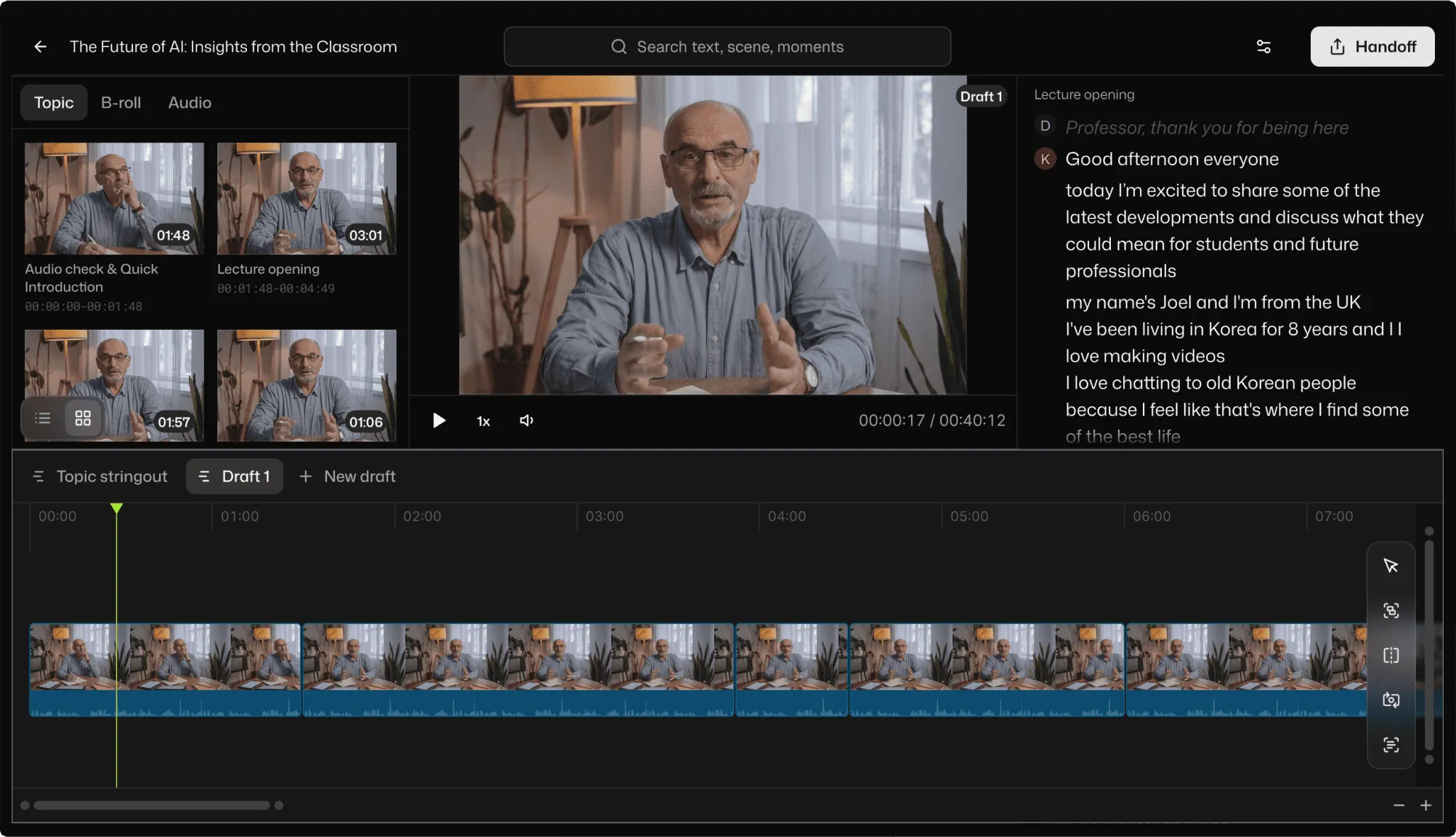
Tell chat where it begins and what to drop: start at "good morning", cut the screen-share setup, keep one answer from the Q&A. Selects watches the recording and builds the cut on a timeline you can change.
Cut the Zoom recording
down to the lesson.
Drop in the recording. Tell Selects where the lesson starts and what to drop.
It cuts the dead air and the "can you see my screen" moments, and splits the recording by topic.
You ran a good session: a few slides, a guest, some Q&A. Zoom recorded all of it, including five minutes of "can everyone hear me", the pauses while you found the next slide, and the three times someone's dog barked.
Turning that into something people watch to the end takes four hours. Find the real start, cut the dead air, trim the tangents, pull the one good answer out of the Q&A, and post it while the topic still matters.
Drop in the folder of raw media
Sync it, then ask for the edit
Export the video, or hand it off
Tell chat where it begins and what to drop: start at "good morning", cut the screen-share setup, keep one answer from the Q&A. Selects watches the recording and builds the cut on a timeline you can change.
Pick no gap, short or medium, or set it exactly: cut anything over 0.8 seconds, but keep the pause after a question. Restore puts them back.
Analysis splits every recording into topics and subtopics. Rename them, drag one onto the timeline to place that segment, or carry them into Adobe Premiere and DaVinci Resolve as markers.
Add captions from the transcript, then ask chat to translate them, and the translation lands on its own track under the original. Export an SRT for each language, or burn them into the video.
| Editing 2h raw video | Editing manually | Selects |
|---|---|---|
| Total time | 4h 00m | 0h 20m |
| Chunk into topics | 1h | included |
| Delete unnecessary clips | 1h | included |
| Transcribe | Impossible | included |
| Cut long silences | 1h | included |
| Cut filler words | 1h | included |
Professionals are already seeing the payoff.
The client said they wanted it super fast.And the only reason I'm not worriedis because we are using Selects.

The Chef Gal (@dachefgyal)
DP, Producer & Editor based in NYC
This will actually look at the video,and it'll catch those reaction shots,those subtleties that all others are gonna miss.

Brent Pierce
Podcast Studio & Video Production Company Owner
Honestly,this is one of the best editing toolsI've tried in a long time.

Serge Morgotch
Video Editing Educator & Creator
This is what AI should really be about,helping us filmmakersrather than taking our job.

Luca Epifani
Filmmaker & Video Creator
A brand-new AI editing softwarethat has literally changedmy 20-year workflow overnight, permanently.

DJ Kerr
Video Editor / Motion Graphics Artist
The client said they wanted it super fast.And the only reason I'm not worriedis because we are using Selects.
The Chef Gal (@dachefgyal)
DP, Producer & Editor based in NYC
This will actually look at the video,and it'll catch those reaction shots,those subtleties that all others are gonna miss.
Brent Pierce
Podcast Studio & Video Production Company Owner
Honestly,this is one of the best editing toolsI've tried in a long time.
Serge Morgotch
Video Editing Educator & Creator
This is what AI should really be about,helping us filmmakersrather than taking our job.
Luca Epifani
Filmmaker & Video Creator
A brand-new AI editing softwarethat has literally changedmy 20-year workflow overnight, permanently.
DJ Kerr
Video Editor / Motion Graphics Artist
Yes. Drop in the recording and Selects transcribes it, splits it into topics, and builds a tighter cut when you ask.
Tell chat what to keep: start where I say good morning, cut the setup before the first slide, keep only the best answer from the Q&A.
Run Remove silence on the draft, or ask chat with a threshold, like remove pauses longer than 1.5 seconds, but leave the ones after a question.
Cut filler words takes out the ums, uhs and repeats on English recordings. Both can be undone.
Yes. Analysis splits every recording into topics and subtopics, which you can rename and use as chapters.
Export the transcript with topic titles, or hand off with the topics as markers in Adobe Premiere or DaVinci Resolve.
About 30 minutes. Analysis runs at roughly 20 minutes per hour of video, and you can keep working while it runs as long as Selects stays open.
Yes. Transcription covers 90+ languages, so you can search and cut a lecture in Korean, Spanish or Japanese the same way.
Cut filler words is English only. You can also translate the captions into another language, on their own track under the original.
Change it, export it or hand it off. The cut is an ordinary timeline, so restore anything by hand or keep giving notes in chat.
Export a video at 4K, FHD or HD, or hand off to Adobe Premiere, Final Cut Pro, DaVinci Resolve or Avid Media Composer with your edit points and clip links intact. Effects, color and text overlays stay behind in a handoff, and transitions arrive as cuts.
Explore our help center for all articles