Video Podcast Setup for 1 to 4 People: Cameras, Angles and Lighting
Video podcast setup diagrams for 1 to 4 people: where cameras, mics and lights go, which camera angles cut best, and mistakes that slow the edit.
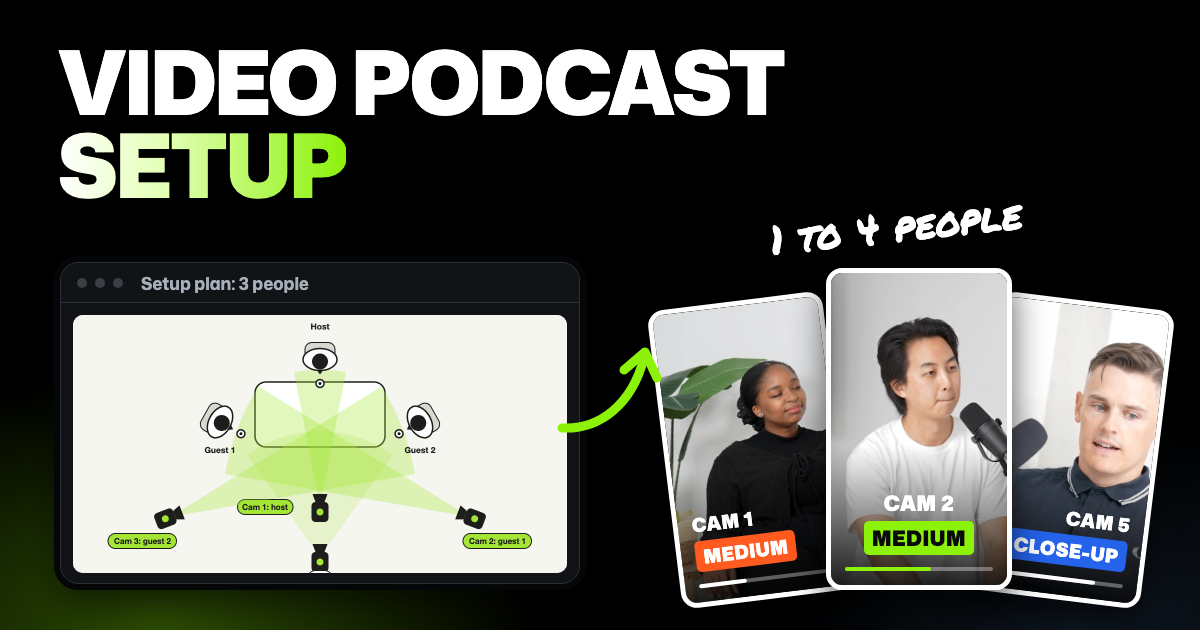
TLDR: A good video podcast setup gives every speaker their own camera, their own mic on a separate track and matching light. Solo shows need one camera, two people need two, and three or four people need one each plus a wide shot. Keep the setup the same every episode and the edit gets faster every week.
You're turning your podcast into a video show, or adding a co-host or guests. Before you buy anything, decide where the cameras, mics and lights go. The diagrams below show a video podcast setup for one to four people, and why each choice saves time when you edit.
- Cameras at eye level, framed chest up. Same height and framing on every camera keeps faces in the same spot when you cut.
- Sound on every camera. Even a camera's built-in mic helps you line the cameras up later.
- One color setting on every light and camera. Then skin tones don't change color when you cut between cameras.
- Tape on the floor. Mark where cameras and chairs go, so the next episode looks exactly like this one.
Here's the gear count at a glance. A wide shot is one extra camera that shows everyone at once. The lighting section below explains key, fill and back lights.
| People | Cameras | Mics | Lights |
|---|---|---|---|
| 1 | 1 (a second for a tighter shot is optional) | 1 | Key, fill and back light |
| 2 | 2, or 3 with a wide shot | 2, each on its own track | A soft key light per person, one shared fill, back lights |
| 3 | 3, plus 1 wide shot | 3, each on its own track | A soft key light per seat, one shared fill, back lights |
| 4 | 4, plus 1 wide shot | 4, each on its own track | One key per seat, matched in color and brightness |
Set up for the edit, not for one great shot
The best podcast camera setup looks a little boring on set. Every camera sits at eye level, every person is framed the same way, and nothing moves between episodes. That sameness is what makes editing fast.
Each cut in a podcast answers one question: who's talking now? When everyone has their own camera, the answer is always a clean shot. When you only have a wide shot, you end up zooming in and losing quality.
Separate tracks matter just as much. People interrupt, laugh and talk over each other. With one mic per person, each on its own track, you can turn down a cough without losing the answer underneath it.
Solo video podcast setup (1 person)
A solo show needs one camera, one mic and three lights. Frame yourself from mid-chest up, with the camera at eye level and a little space above your hair.
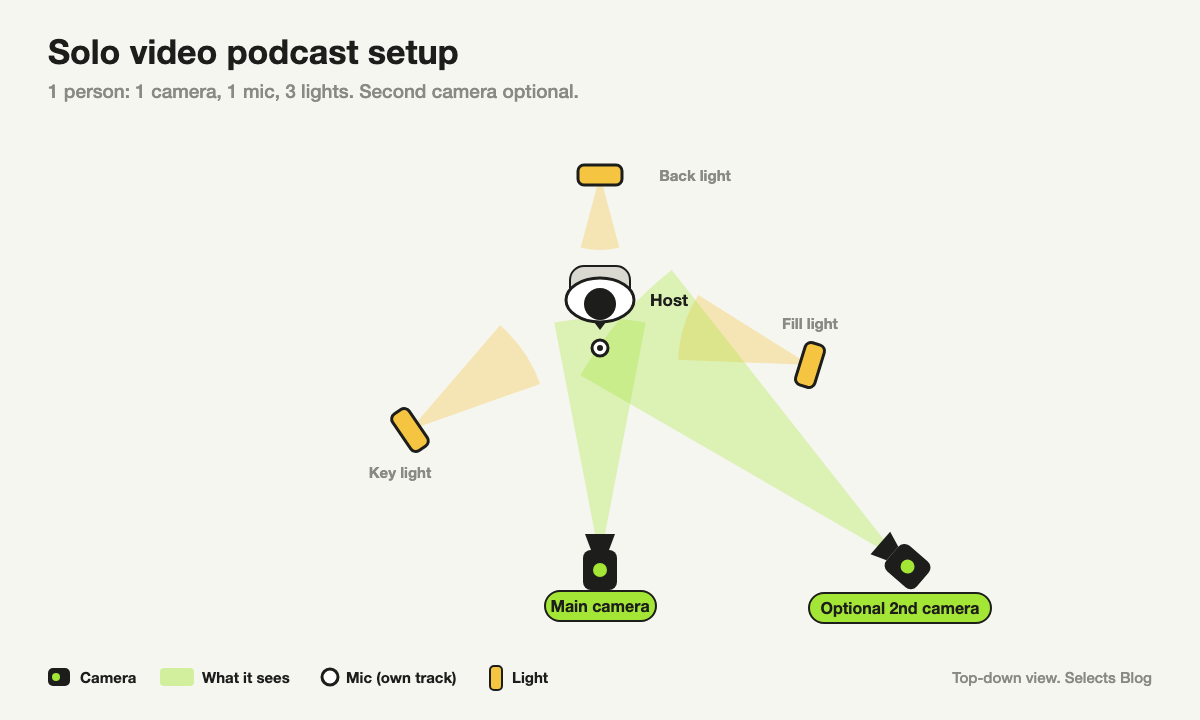
- Main camera straight on. Look into the lens, like you're talking to one viewer.
- Optional second camera. A tighter shot or a slight side angle gives you something to cut to. It also works well for short vertical clips.
- Mic close to your mouth. A mic a few inches away beats a better mic across the room.
Get this right before guests arrive. The framing and light you settle on now become the template for every seat you add later.
2 person podcast setup
For two people, each person gets a camera aimed at them from just beside the other person. That puts their eyes slightly off the lens, as if they're talking to the other person, which looks natural on screen.
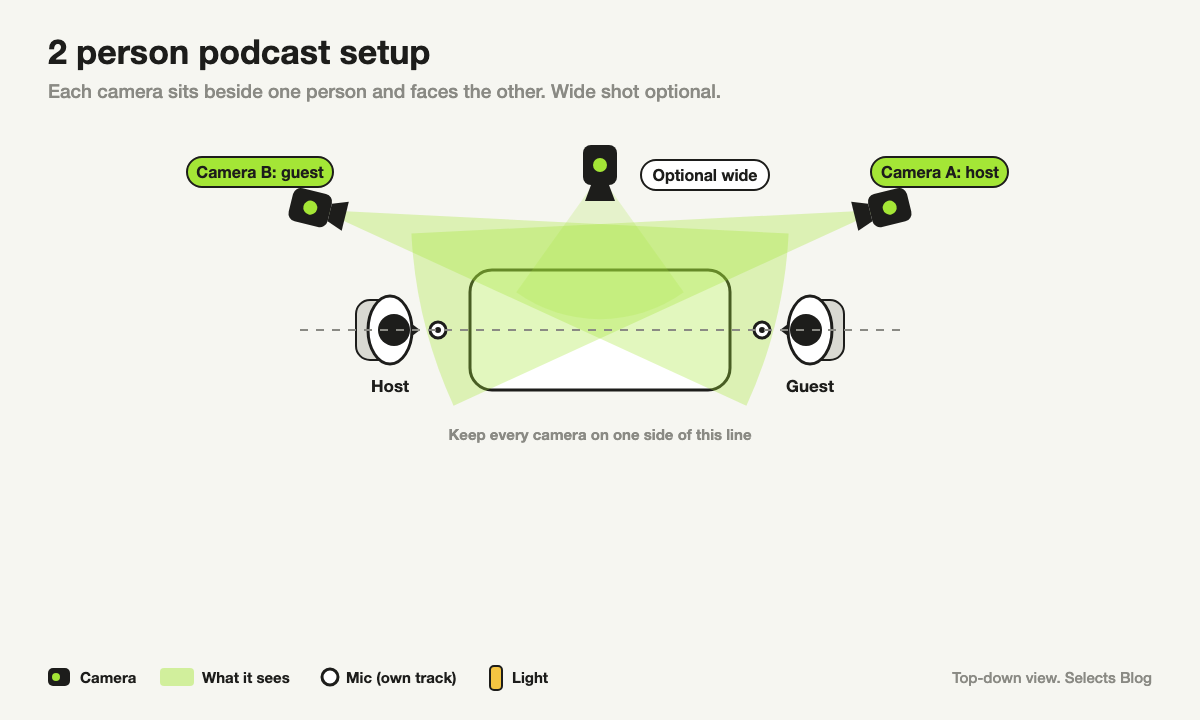
You have two options:
- Two cameras, two single shots. The simplest setup to edit. When someone speaks, you cut to their camera.
- Two singles plus a wide shot. The wide shot shows both people together. Use it when you need a breather between topics, not for whole answers.
Keep both cameras on the same side of an imaginary line between the two people. Crossing it makes the two people look like they're facing the same way, which confuses viewers. Editors call this the 180-degree rule.
3 person podcast setup
Three people is where most setups start to strain. Speakers change faster, and a single wide shot stops working: everyone looks small, so viewers can't tell who's talking.
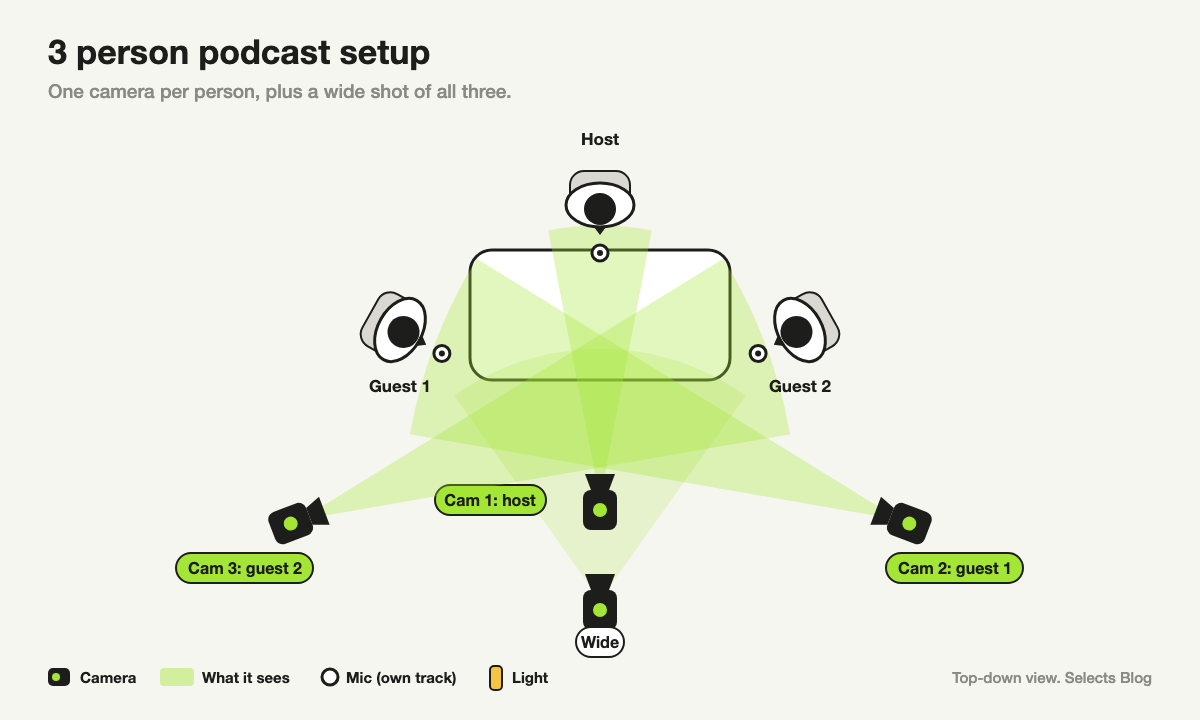
- One camera per person. Place each camera so it sees that person's face, not a side view of their head.
- One wide shot in the middle. For reactions and moments when two people talk at once.
- Every mic on its own track. With three voices, people talk over each other often.
Light gets harder too. Small differences between seats show up as a jump every time you cut. Use the same kind of light on every seat, set to the same color.
4 person podcast setup: panel or roundtable
With four people, pick a layout and design everything around it. The two common ones are a panel and a roundtable.
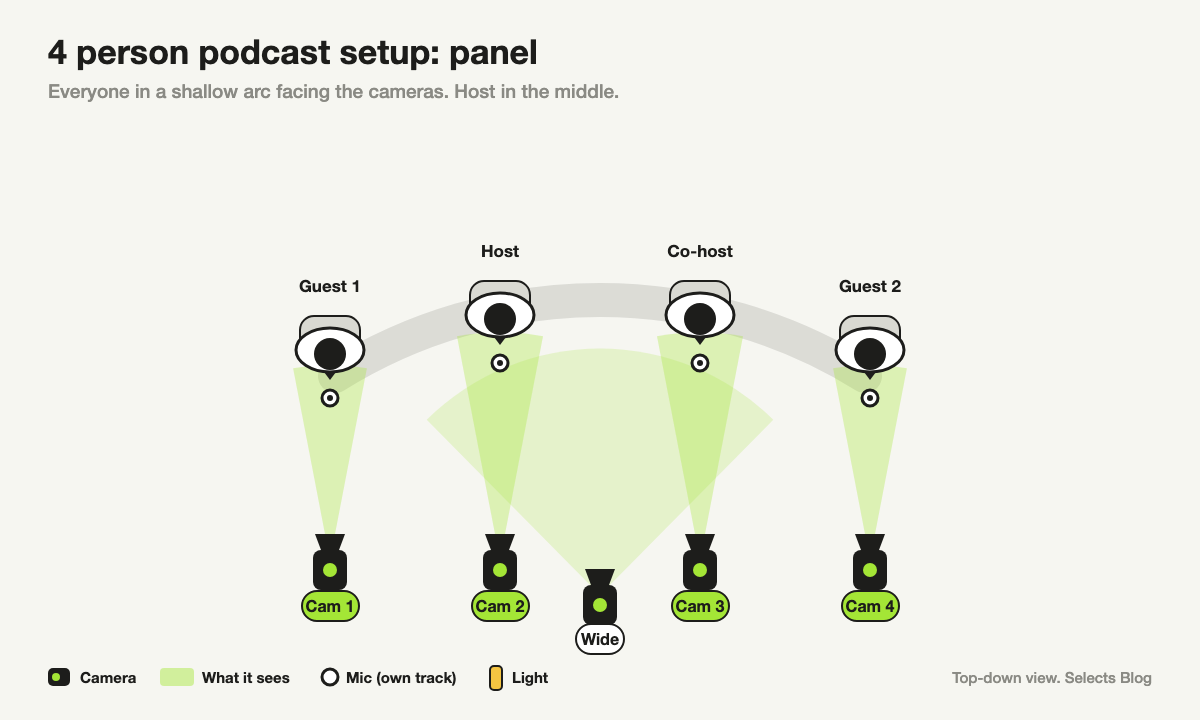
A panel puts everyone in a shallow arc facing the cameras. It's the easier one to edit. Each camera has a clear view of one face, and the host usually sits in the middle.
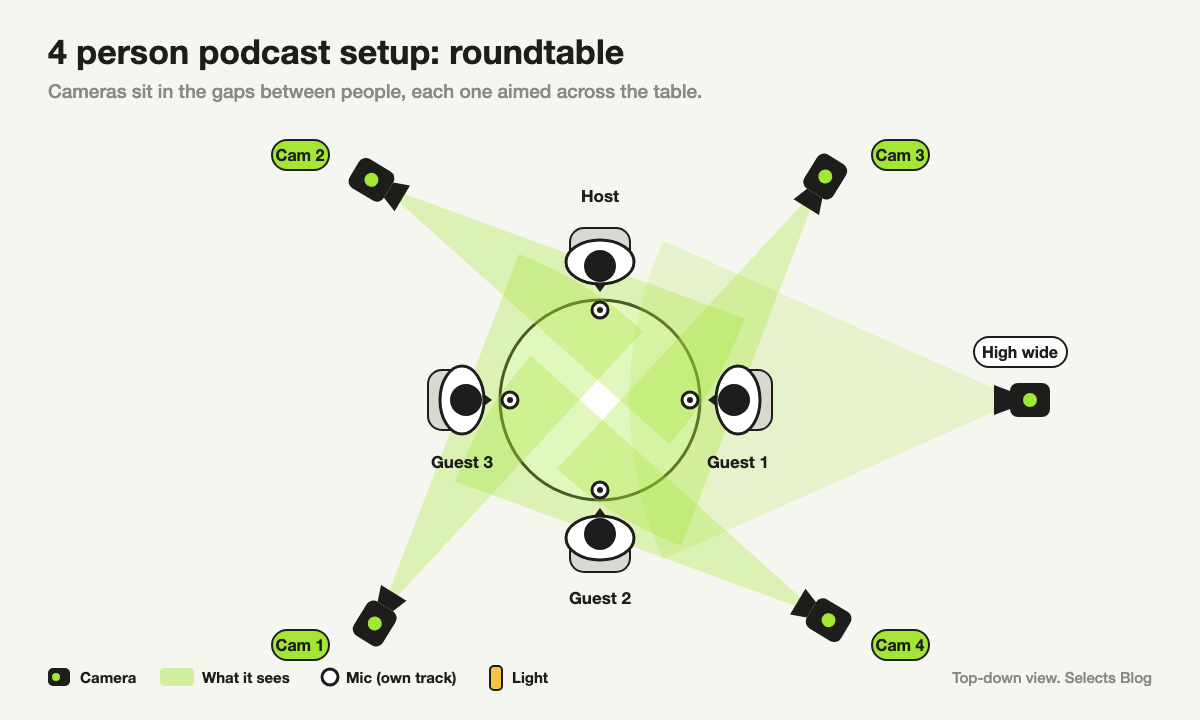
A roundtable feels more like a real conversation. The catch is camera angles: some faces end up side-on, and cameras can end up in each other's shots.
With cameras all around the table, the 180-degree rule from the two-person setup can't hold for every camera. Plan where each camera sits before the first recording.
Either way, give the host the most reliable camera, since the host drives the conversation. The wide shot covers group reactions.
Podcast camera angles that cut well
The most useful podcast camera angle is a medium close-up: chest up, eyes about a third of the way down the frame. It shows faces clearly on a phone and still leaves room to crop a vertical clip later.
| Shot | What it shows | When to use it |
|---|---|---|
| Medium close-up | One person, chest up | Most of the episode |
| Close-up | One face, shoulders up | Strong reactions and big moments |
| Wide shot | Everyone at the table | Openers, breaks, people talking at once |
Avoid extreme angles, like a camera far above or below eye level, or one that sees only the side of a face. They look interesting once and odd every time you cut to them. Match the height and framing of every camera, so faces sit in the same spot from shot to shot.
Podcast lighting setup
Light for the edit, not for drama. Even light on every face means you can fix color once for the whole episode instead of shot by shot.
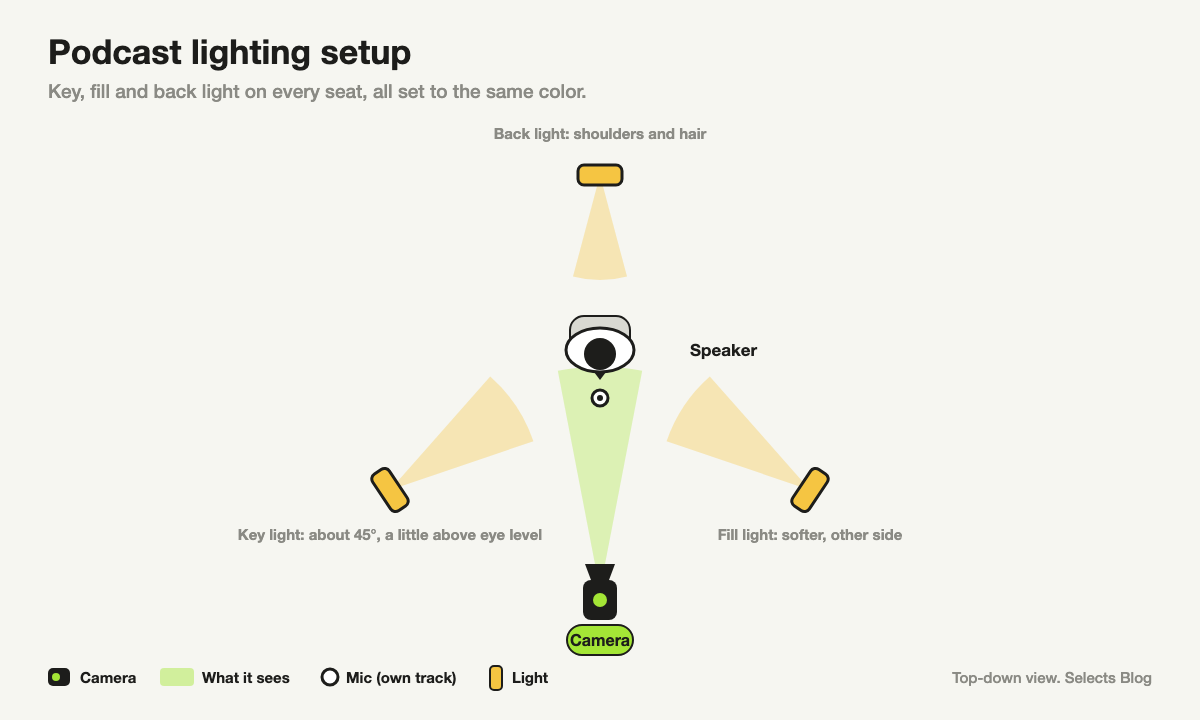
- Key light. Your main light, about 45 degrees to one side and a little above eye level. Soft light, which gives gentle shadows, is better: a panel with a white diffuser cover, or a light bounced off a wall.
- Fill light. A dimmer light on the other side, so the shadow side of the face isn't dark.
- Back light. Behind the person, aimed at their hair and shoulders, so they don't blend into the background.
Turn off overhead room lights and cover bright windows. Mixed light makes faces change color as you cut between cameras.
Set every light to the same color, written on the light as a number like 5600K, a common daylight setting. Then set every camera's white balance to that same number, not auto. White balance is the camera setting that decides what counts as pure white.
Audio: one mic per person, plus sound on every camera
Clean sound matters more than camera quality. People will watch a slightly blurry picture, but they'll leave if they can't hear.
Give each person their own mic and record each mic to its own track. An audio recorder or audio interface (a box that connects mics to your computer) with one input per person does this.
Also keep sound recording on every camera, even if you'll never use it. That camera sound is how editing software lines up all your cameras and mics later. A single clap at the start, where every camera can hear it, makes lining up even easier.
How your setup pays off in the edit
A setup like this turns editing into a few decisions instead of hundreds. Selects is an AI video editor made for this kind of setup. Lining up your files (syncing), spotting who's talking and switching cameras are built in, with no add-on plugins required.
First, Selects watches and listens to the footage, so it knows what was said and who is speaking. That step is called analysis, and it uses credits. New accounts start with 1,800 free trial credits, and after that it takes a paid plan.
Then Selects lines up 10 or more cameras and separate mics by sound or by timecode, a clock some cameras record into the file. The transcript from analysis helps it line them up more accurately. Selects can't line up by picture, so the sound on every camera matters.
You can also sync without analyzing first. That uses no credits unless you ask chat to do it. Chat is the AI assistant built into Selects.
Once the files are synced, Selects matches each speaker to a face and a mic. You can then ask chat to switch cameras to whoever is speaking. You can add rules in plain words, like "hold each angle for at least five seconds."
In my experience, camera switching is the biggest job in a podcast edit, even when the shoot is perfect. By hand, a one-hour episode takes me about two hours of scrubbing the timeline and switching cameras with keyboard shortcuts. Then I watch it all again to check every cut looks natural.
Most automatic switching plugins, including our own Premiere Assistant, only listen to the audio. So they cut to whoever is talking, or give each camera a set share of the time. They miss laughs, nods and hand gestures.
Selects' analysis also looks at the picture, so it knows what's happening on screen, not just who's speaking. It can find shaky or blurry shots, like a camera moving between framings. Then it switches to a clean angle of the same person instead.
On a 30-second podcast clip, a professional editor on our team asked several tools to switch cameras by speaker and reaction. Selects switched naturally, used reaction close-ups and covered jump cuts with camera changes. A jump cut is the skip you see when a pause is cut out.
Premiere Pro's AI Assistant cut to an unimportant camera, and Descript's AI missed reaction shots. It was one run per tool, and the full test is on our comparison page.
For click-by-click steps, see how to sync your cameras and mics in Selects.
Common video podcast setup mistakes
- Only a wide shot. It's quick on the day, but you can't cut to the speaker, and zooming in looks blurry.
- One mixed audio track. When two people talk at once, you can't fix either voice.
- Cameras with sound turned off. Unless every camera records the same timecode, lining them up becomes a manual job.
- Lights in different colors. Each cut makes faces change color.
- Moving the setup between episodes. A camera a few inches higher makes this week's episode look different from last week's.
FAQs
What camera setup do I need for a host and guest podcast?
Two cameras: one aimed at the host from beside the guest, and one aimed at the guest from beside the host. Add a third camera for a wide shot of both if you want a shot to cut to between topics. Give each person their own mic on a separate track.
How many cameras do you need for a podcast?
One per person on screen, plus a wide shot once you have three or more people. A solo show needs one camera, and two people need two, with an optional wide shot. Four people need five: one each, plus the wide shot.
Can you do a video podcast with one camera?
Yes, one camera at eye level is all a solo show needs. For two or more people, one camera means a wide shot only, which makes cutting to the speaker hard. If you only have one camera for two people, frame both of them tightly and add a second camera when you can.
What is the best camera angle for a podcast?
A medium close-up at eye level, framed from the chest up. It keeps faces clear on small screens and leaves room to crop vertical clips. Keep every camera at the same height and framing so cuts look smooth.