Assembly Cut vs Rough Cut: What Each Means and Every Editing Stage in Order
Assembly cut vs rough cut: what each stage means, how they differ, and the full video editing process, from selects to fine cut, picture lock and export.

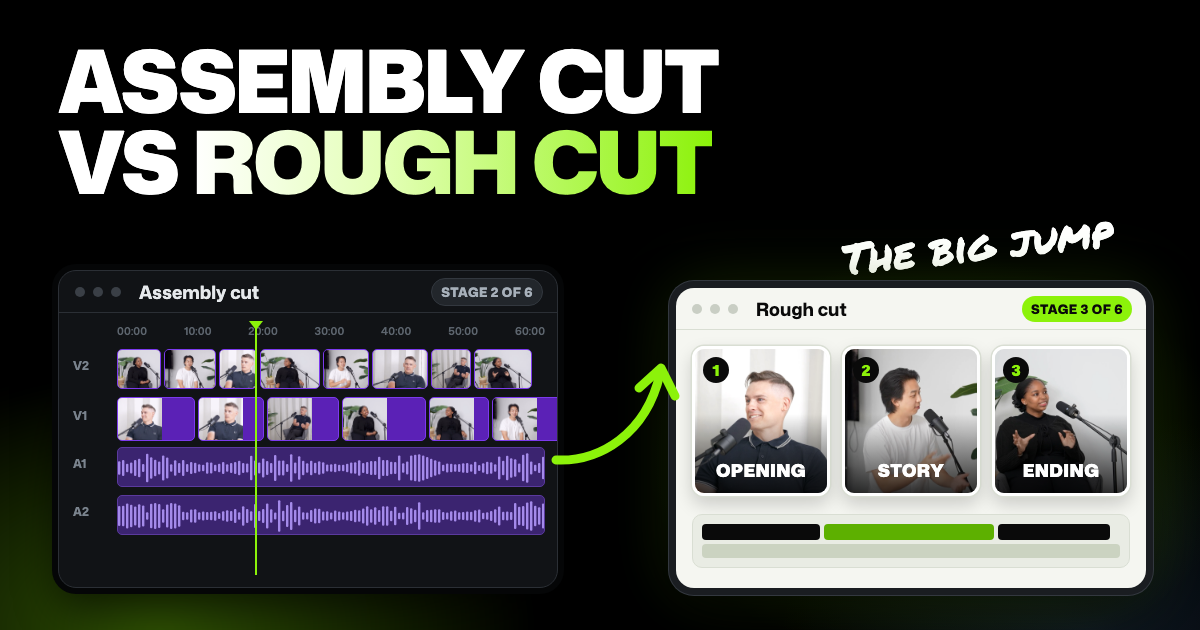
TLDR: An assembly cut is the first full version of a video: every usable take in order, with no story decisions yet. A rough cut comes next. You choose what stays, cut what doesn't and set the order, so the story works even if the timing is still loose.
You've seen "assembly" and "rough cut" in a client email or a film article and want to know which is which. Assembly cut vs rough cut comes down to one question: has anyone decided the story yet? Below is what each stage means and the full order, the same for a feature film or a weekly YouTube video.
- The assembly is mostly for the editor. It's long and messy, and few other people see it.
- The rough cut is the first version others review. Their notes should be about structure, not small details.
- The fine cut is about timing. This is where choppy edits get fixed.
- Picture lock means no more cuts. Sound, color and graphics get finished after it.
Assembly cut vs rough cut: every stage at a glance
Here's every stage of the video editing process in one table, in order. The lengths are rough guides that depend on how much you filmed and how long the final video needs to be.
| Stage | What it is | Goal | What gets cut | Who usually signs off | Typical length vs final |
|---|---|---|---|---|---|
| Paper edit and selects | A marked transcript, list or folder of the best takes, picked before the edit is built | Pick the strongest moments before you start cutting | Weak takes and off-topic sections are left out of the plan | The editor, often with the director or producer | Shorter than the raw footage, longer than the final |
| Stringout and assembly | Usable takes laid end to end, in script or story order | Get everything usable in one place, in order | Only unusable material: false starts, camera tests, dead time | Usually no formal sign-off: the editor checks it, and on a film the director sees it next | Usually longer than the final, often by a lot |
| Rough cut | The first version with story decisions made | Make the story work | Repeated answers, tangents, retakes, whole scenes | Director, producer or client, in the first real review | Closer to the target, usually still long |
| Fine cut | The rough cut tightened shot by shot | Make the timing feel right | Frames, breaths, pauses and small trims | Director, producer or client, often over a few rounds | At or very near the target |
| Picture lock | The approved edit, frozen | Agree that no more cuts will change | Nothing | Whoever has final say: director, producer or client | Final length |
| Finishing | Sound mix, color, graphics and captions, then export | Make it look and sound finished | Nothing: the picture stays as locked | The client or producer approves the final file | Final length |
The big jump is between the second and third rows. An assembly cut asks "do we have everything, in order?" A rough cut asks "what's the story?"
What is an assembly cut?
An assembly cut is the first time all your usable footage sits on one timeline. That's the strip in an editor where clips sit in order. Usable takes go in script or story order: for an interview, every useful answer in full, in the order asked.
Nothing is trimmed for story or pace yet. You only remove what can't be used: a camera pointed at the floor, false starts, the chat before recording began. If you filmed on several cameras, they're lined up (synced) on separate tracks, with the original sound and no music yet.
"Assembly edit" means the same thing. An assembly isn't supposed to be good. It's supposed to be complete, so nothing useful gets forgotten later.
Stringout vs assembly
A stringout is every usable clip strung end to end on one timeline, usually grouped by scene or topic. Many editors use stringout and assembly for the same thing. When they're different, the stringout is the raw grouping and the assembly puts those clips in story order. Here's what a stringout is and how it differs from selects.
What is a rough cut?
A rough cut is the first version of the video where someone made story decisions. Starting from the assembly, you decide what stays, what goes and what order serves the story. Repeated answers go, tangents go, and the opening and ending take shape.
It's still rough on purpose. The pacing may be loose, cuts may jump, the sound is uneven and the color isn't touched. But anyone watching it should understand what the final video is trying to do.
The rough cut is also the first real review. Feedback at this stage should be about structure, like "the middle drags" or "open with the customer story." A note about a caption typo can wait for the fine cut.
The video editing process, stage by stage
On a film or a client project, each stage below often gets its own review. If you edit your own videos, the stages blur and you might do three of them in one sitting. Keep the order of decisions anyway: story before timing, timing before polish.
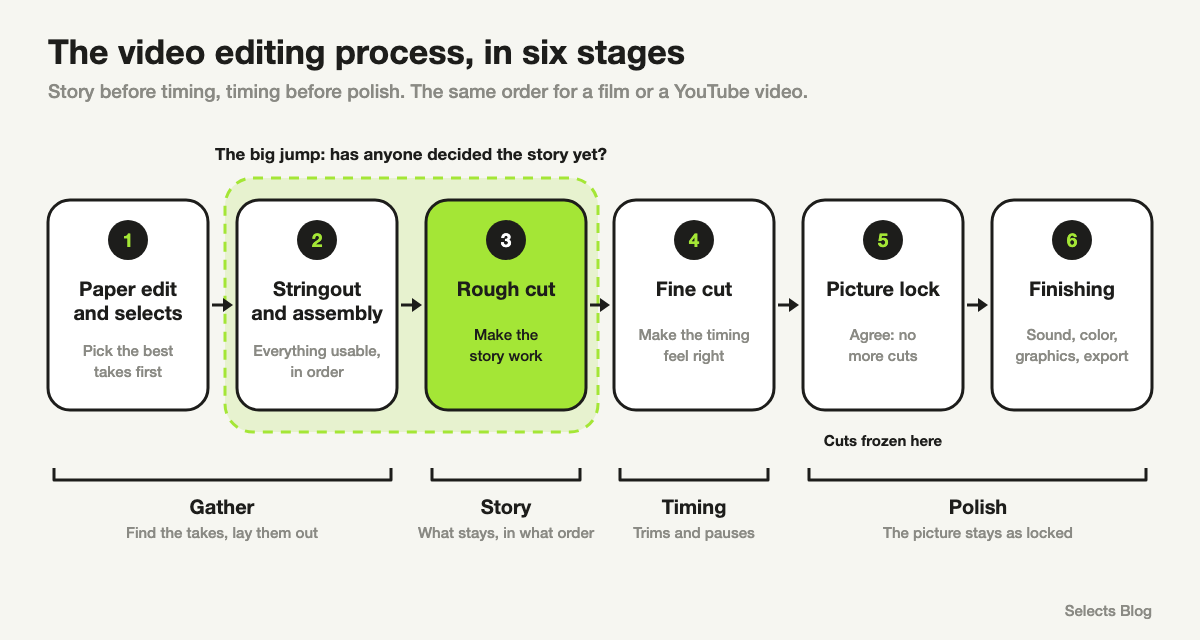
1. Paper edit and selects
A paper edit is the plan for the video, built from the transcript before you cut anything. You highlight the lines you want and put them in order. The best takes you pick are called selects (not to be confused with Selects, the AI video editor we make).
This stage is most useful for interviews, documentaries and anything with a lot of talking. Reading a transcript is much faster than scrubbing through hours of footage.
2. Stringout and assembly
Your selects go on the timeline, end to end, in order. This is mechanical work: syncing cameras, labeling who's speaking and laying clips down. It needs care more than creative judgment.
3. Rough cut
Now the creative work starts. You cut for story, choose between takes and find the opening. Expect several versions, and keep the old ones in case someone asks for a line back.
4. Fine cut
The fine cut keeps the rough cut's structure and works on timing. You trim the start and end of each clip, fix jump cuts and set the rhythm. Small story changes still happen here, but big ones mean you're back in the rough cut.
5. Picture lock
Picture lock means everyone agrees the cuts are final. The next steps depend on it. A sound mix or a color pass is built clip by clip, so changing a cut afterward means redoing that work.
6. Finishing: sound mix, color, graphics and export
Voices are balanced and cleaned up, music sits under them, and colors are matched between shots. Titles, captions and graphics go on. Then you save the finished video (export) in the format your platform wants.
On small projects, one person does all of this in the same editor. On bigger ones, a sound mixer, a colorist and a graphics artist each take a part.
Why your edit feels choppy, and which stage fixes it
If your video feels choppy, the problem is usually pacing, not your footage. Pacing problems get fixed between the rough cut and the fine cut. A rough cut is allowed to feel choppy, but a fine cut isn't.
The usual causes:
- Cuts that clip words. A cut lands on the first or last sound of a word, so speech sounds chopped.
- Every pause cut to the same length. Removing all silence the same way makes speech feel rushed and mechanical.
- Jump cuts left uncovered. A jump cut is the visible skip when a pause is cut out of one shot.
- Sound that jumps between clips. One clip is louder or has a different room hum than the next.
In the fine cut, land each cut on a breath, not mid-word. Leave a short pause after a question or a punchline, because those beats let the viewer react. Cover jump cuts with a camera change or extra footage that plays over the talking, and even out the sound.
Don't spend time on these fixes during the rough cut. If the story changes, you'll throw that work away.
Where an AI video editor speeds up the early stages
AI helps most with the assembly and the first rough cut, because most of that work is finding, sorting and placing clips. Selects is an AI video editor that builds a rough cut from your footage when you ask for one in chat.
First, Selects watches and listens to your footage. That step is called analysis: it gives every word its exact timing, tells which person is speaking and describes what's on screen. Selects sends audio and still frames for analysis, never your video file.
Analysis and chat on Selects' AI models use credits. New users start with 1,800 free trial credits, and after that it takes a paid plan.
Then you describe the rough cut you want, the way you'd brief an assistant editor:
Build a 12-minute YouTube video from this interview. Cut setup chatter and repeated answers. Keep every question in full and never cut mid-sentence. Open with her strongest point about pricing, then keep the order.
Selects builds that rough cut as a draft on a real timeline, with your original clips untouched.
If you shot on several cameras, the order matters: import, analyze, sync the cameras and check the speaker names. Then ask for the rough cut, clean up pauses and filler words, and switch cameras last.
How close an AI rough cut gets
A professional editor on our team ran a scripted test on five AI tools. Each got the same script and the same 7 minute 13 second recording of one person talking to camera, full of retakes.
A human editor's cut of it ran 1:58. Selects came in at 2:00 and kept no retakes. Descript came in at 2:12, Adobe Premiere's AI Assistant at 2:14, Claude working on its own at 2:16 and CapCut at 3:30.
We make Selects, one of the tools in that test. It was one run per tool, and the full test is on our comparison page.
Close to the human length doesn't mean finished. It means the rough cut arrives in the right shape, so your time goes into the fine cut instead of the assembly.
You still make the calls
Selects doesn't know what your video is for unless you tell it. A vague request like "cut it down" gets you someone else's edit. A request with a goal, a length and a few rules gets you a rough cut you can refine.
For wording that works, see how to write prompts for AI editing in Selects.
When you review, you can leave notes as you watch and send them all to chat at once. Chat proposes one plan covering every note and builds a new draft once you confirm, leaving the reviewed one as it was.
You can finish the whole video in Selects. You can also hand the locked edit to Premiere Pro, Final Cut Pro, DaVinci Resolve or Avid Media Composer. Effects, color, text and volume changes don't carry over, so do that finishing in the editor you hand off to.
FAQs
Is a rough edit the same as a rough cut?
Yes. Rough edit and rough cut mean the same stage: the first version of the video with story decisions made.
What's the difference between a rough cut and a fine cut?
A rough cut settles the story, and a fine cut settles the timing. In the rough cut, whole answers and scenes move or go. In the fine cut, the structure stays and you trim frames, pauses and breaths until it flows.
Can AI make an assembly cut or a rough cut?
Yes, if it knows what's in your footage. After analysis, an AI video editor can lay out the usable takes or build a first rough cut from a written request. You still review it, decide what the story is and do the fine cut.