The Best OpusClip Alternatives, by the Limit You Hit
Out of OpusClip credits or stuck with a watermark? Compare 7 OpusClip alternatives by price, free plan, export quality and hand editing.

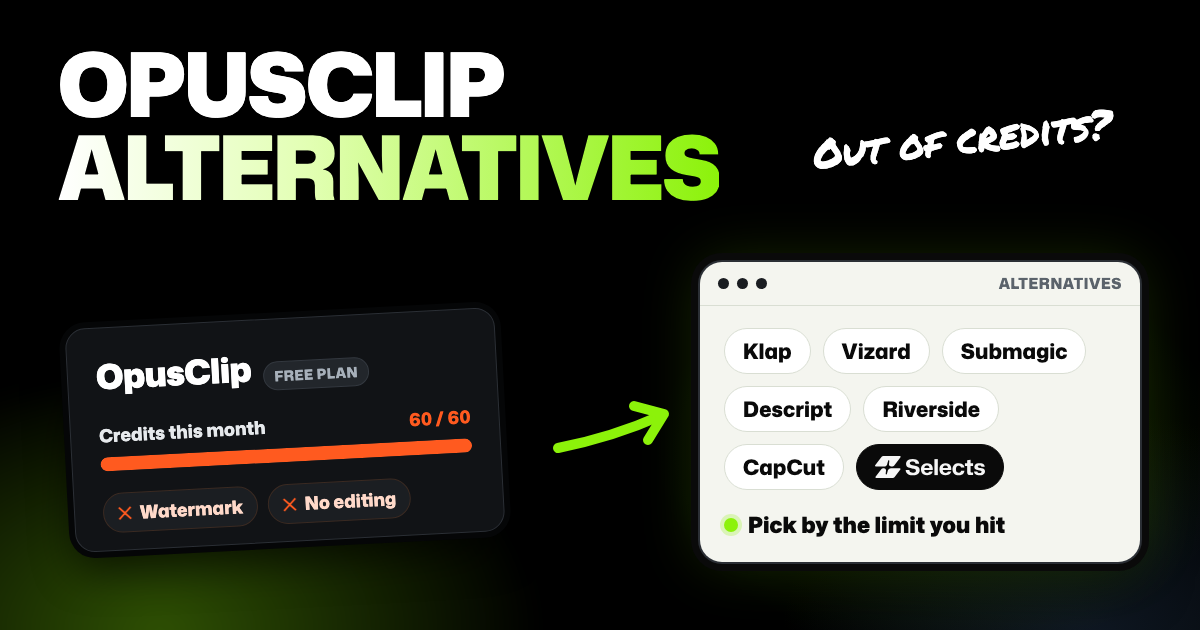
TLDR: The best OpusClip alternative depends on the limit you hit. Klap counts clips instead of video minutes, Vizard exports in 4K on paid plans, and Descript edits clips by text. If you want clips and a full editor in one project, Selects makes each clip its own timeline.
You've been making short clips in OpusClip, and something got in the way. Maybe the free credits ran out after one long video, or you need clips without a watermark. Maybe you want to fix a clip by hand instead of making it again. This guide compares seven OpusClip alternatives: the limit each one fixes, where it falls short, and the price.
- Clips are all you make, on a phone or in a browser? OpusClip may still be your best pick. See the section on when to stay.
- Recording guests remotely? Riverside records the call and makes clips in the same place.
We make Selects, one of the tools below. Every price is the US price on the company's own page on November 13, 2026. Plans change often, so click through before you subscribe.
Why people outgrow OpusClip
OpusClip is an AI clipping tool: you give it a long video, and it finds the moments worth posting as short clips. Its plans are built around credits, and most of the reasons people leave trace back to them.
- Credits run out fast on long videos. The free plan gives 60 processing minutes a month (minutes of video it can process), and Starter gives 150. One long podcast can use a month's free allowance.
- The free plan is a trial in practice. Free clips carry a watermark, can't be edited, and can't be exported after 3 days.
- Wide and square clips cost more. Free and Starter make 9:16 vertical clips only. Pro adds 1:1 and 16:9.
- Editing in another app costs more too. Export to Premiere Pro and DaVinci Resolve starts on Pro, at $29 a month.
OpusClip alternatives side by side
| Tool | Cheapest paid plan | What a plan covers | Free option | Best export on paid plans | Edit a clip by hand |
|---|---|---|---|---|---|
| OpusClip | Starter, $15 a month (monthly only) | 150 credits a month (processing minutes) | 60 credits a month; watermark, up to 1080p, no editing, export within 3 days | "Highest resolution available"; 4K download only on Business (custom price) | Text and timeline editor, from Starter |
| Klap | Basic, $29 a month, or $14.50 billed yearly | 100 clips a month; source videos up to 3 hours | One video as a trial; downloading and posting need a paid plan | Not listed | Editor that adds B-roll (cutaway footage) and hook titles |
| Vizard | Creator, $29 a month, or $14.50 billed yearly | From 600 credits a month (1 credit is 1 minute of video, limits) | 60 credits a month; 720p, exports up to 10 minutes, 3-day storage | 4K | Video editor on every plan |
| Submagic | Starter, $19 a month, or $12 billed yearly | 45 credits a month: 15 videos or 5 Magic Clips | Trial of 3 short videos; downloads without a watermark need a plan | 1080p on Starter, 4K on Business | Text-based trimming |
| Descript | Hobbyist, $24 a month, or $16 billed yearly | 10 hours of media and 400 AI credits a month | 60 minutes of media a month; 720p with a watermark | 1080p on Hobbyist, 4K on Creator | Edit the transcript or the timeline |
| Selects | Starter, $20 a month, or $16 billed yearly | 3,600 credits a month (up to 10 hours of analysis) | Free editor and export; 1,800 trial credits for analysis and AI | Up to 4K | Each clip is its own multi-track timeline |
| Riverside | Pro, $24 a month billed yearly (monthly billing costs more) | Magic Clips use no AI credits | Magic Clips included; up to 720p with a watermark | Up to 4K (Magic Clips) | Text-based editing |
| CapCut | Pro, $19.99 a month, or $179.99 a year | 700 AI credits a month (pricing page) | Free plan with basic tools; 8K export on desktop; watermark Not listed | Up to 8K on desktop, on every plan | Full timeline editor |
The biggest difference is what a plan counts. OpusClip and Vizard count minutes of video you upload. Klap counts the clips it makes. Ten clips from a 3-hour stream use the same allowance as ten clips from a 20-minute video.
Klap
- Good at: clips by count, not by minutes. Klap says the length of your source video doesn't use up your plan, and it takes videos up to 3 hours. It turns wide video vertical and keeps whoever is speaking in the shot. It also adds animated captions and posts to TikTok, YouTube, Instagram, LinkedIn and Facebook.
- Bad at: trying it for free. The trial covers one video, and you can't download or post clips without a paid plan. Its pricing page doesn't list an export resolution.
- Price: Basic at $29 a month or $14.50 billed yearly ($174 a year) for 100 clips a month. Pro is $79 a month or $39.50 billed yearly for 300 clips. See Klap's pricing.
- Best for: streamers and podcasters with long videos who want lots of clips without counting minutes.
Vizard
- Good at: export quality and a usable free plan. Paid plans export in 4K, and the free plan includes the full video editor. Creator adds social post scheduling and 100 GB of storage.
- Bad at: long free uploads. Free uploads stop at 60 minutes, exports at 720p and 10 minutes, and files are kept for 3 days. Like OpusClip, it counts minutes, so long videos use credits fast.
- Price: free with 60 credits a month, then Creator at $29 a month or $14.50 billed yearly ($174 a year). Business is $39 a month or $19.50 billed yearly. See Vizard's pricing.
- Best for: YouTube Shorts creators who want 4K exports and an OpusClip-style flow.
Submagic
- Good at: captions. Its plans lead with animated AI captions and caption templates. Magic Clips turns a long video or YouTube link into short clips you can then tweak.
- Bad at: volume on the cheaper plans. Starter's 45 credits cover 15 captioned videos or 5 Magic Clips a month. Removing silences and bad takes needs Pro, and 4K export needs Business.
- Price: Starter at $19 a month or $12 billed yearly, per member. Pro is $39 a month or $23 billed yearly. See Submagic's pricing.
- Best for: creators who post a few clips a week and care most about how the captions look.
Descript
- Good at: fixing a clip through its transcript. Remove a line of text, and that moment leaves the clip too. Create Clips makes 1 to 20 clips, each 10 seconds to 5 minutes. Each clip is its own composition (a separate edit) you can change. For voice cleanup, there's Studio Sound.
- Bad at: clip volume on the cheaper plans. Hobbyist covers 10 hours of media a month. On the free plan, Create Clips is limited and exports are 720p with a watermark.
- Price: a free plan, then Hobbyist ($24 a month, or $16 billed yearly) and Creator ($35 a month, or $24 billed yearly). 4K export starts on Creator. See Descript's pricing.
- Best for: people who want manual control and like editing by text.
Selects
Selects is an AI video editor, and Clipper is its built-in app for cutting shorts from a long video. Clipper works from Selects' analysis of the recording, which maps each word's timing and who says it. That map is how it picks moments and frames the right person.
- Good at: shorts that stay editable. Every clip Clipper makes becomes a separate timeline in the same project, the track view where you trim and arrange it. A caption typo or a slow start is a quick fix by hand, not a fresh run. One run gives up to 30 clips, and automatic framing follows the people speaking. A template controls the captions, headline and frame shape, and you can design your own. Then post to TikTok, YouTube or Instagram, as many as 10 clips at a time.
- Bad at: being a quick clip tool. If you never edit anything but clips, a full editor is extra weight. Selects runs on computers only, in the browser or as a Windows 11 and Apple Silicon Mac app. There's no phone app yet. Clipping from a pasted video link works only in the desktop app.
- Price: editing and exporting cost nothing. Clipper spends credits on analysis, then on finding moments and writing headlines (or uses your connected AI model for those). Before analysis runs, Selects shows the cost and waits for your OK. New accounts start with 1,800 free trial credits, then Starter is $20 a month ($16 billed yearly). See Selects plans and credit costs.
- Best for: most videos you film yourself, including YouTube videos, vlogs, tutorials, courses, interviews, video podcasts, short clips and event videos. It fits best when you cut the full episode and its shorts in the same place.
Say a clip runs a few seconds long. Open it from the Clips list, trim the end on its timeline, and post it.
Filmed a podcast on several cameras? Line them up as a synced timeline (one video built from all the angles), analyze the footage, and Clipper can clip that too. For back-and-forth conversation, the Podcast split screen template puts one speaker above the other in the tall frame. The Clipper guide has the full steps.
Riverside
- Good at: recording and clipping in one place. Guests join from a browser link, and Magic Clips picks highlights from the recording. You can steer it toward a speaker or topic. Riverside says Magic Clips use no AI credits, even on the free plan.
- Bad at: being a standalone clipper. Riverside is built around recording, so it fits best when the show is already recorded there. The free plan exports at 720p with a watermark.
- Price: free plan, then Pro at $24 a month billed yearly ($288 a year). Paying monthly costs more, so check the current monthly price on Riverside's pricing.
- Best for: podcasts and interviews recorded with remote guests in Riverside.
CapCut
- Good at: template-based social edits, with apps for phones and computers. Its AI Clip Maker finds highlights in a long video and resizes them from wide to vertical, following the subject. After that, you have a full timeline editor.
- Bad at: clear limits. CapCut's pricing page shows local currency and doesn't list a free watermark rule. Its plan guide puts advanced AI tools such as auto captions on Pro, though its caption page says AI captions are free on CapCut Web. The AI Clip Maker page is for the CapCut desktop app and doesn't say which plan it needs.
- Price: free plan, then Pro at $19.99 a month or $179.99 a year, according to CapCut's plan guide. It says prices vary by region and platform.
- Best for: creators who already edit in CapCut and want clips without another subscription.
When to stay with OpusClip
If you only make clips, OpusClip has the shortest path of any tool here. Upload in the browser or the iPhone app, and captioned clips come back ready to post.
From Starter, each clip gets a virality score, an AI guess at how well it may do. You can also post straight to YouTube Shorts, TikTok or Instagram Reels. Pro is $29 a month, or $14.50 billed yearly ($174 a year), and adds Premiere Pro and DaVinci Resolve export.
Our head-to-head comparison of Selects and OpusClip reaches the same verdict. For a clips-only workflow, OpusClip is the purpose-built choice. Selects makes sense when the shorts come out of a longer edit you're already doing.
Tips before you switch
- Run the same long video through each tool. A 5-minute sample hides the problems. Long videos show how fast credits go and whether clips start mid-thought.
- Check what the plan counts. Minutes, clips and credits aren't the same thing. Tools that count minutes charge by the length you process, however many clips you keep. Klap charges per clip instead. In Selects, you pay to analyze a video once, and later Clipper runs on it reuse that analysis.
- Export quality can't beat your recording. A 4K export from a 1080p video won't look sharper. Reframing from wide to vertical also crops away most of the width, so film with room around the speaker.
FAQs
Is there a free alternative to OpusClip?
Not one without limits. Vizard's free plan gives 60 credits a month at 720p, and Riverside's Magic Clips are free with a watermark. CapCut's free plan exports up to 8K on desktop, but its plan guide puts auto captions on Pro (AI captions on CapCut Web are free).
Selects lets you edit and export without paying, but Clipper isn't free: analysis and chat use credits. A new account's 1,800 trial credits are enough to analyze about 5 hours of video.
Which OpusClip alternatives let you edit a clip by deleting text?
Descript, Riverside and Selects all let you cut a clip by deleting words from its transcript. Submagic offers text-based trimming. OpusClip itself has a text and timeline editor from the Starter plan. Here's how text-based video editing works if you're new to it.
What's the best Opus Clip alternative for YouTube Shorts with better export quality and reframing?
OpusClip's free plan exports up to 1080p, and its pricing page lists 4K download only on the custom-priced Business plan. For 4K with a similar flow, Vizard's Creator plan works much like OpusClip. Descript Creator, Submagic Business, Riverside Magic Clips (on paid plans) and Selects also export in 4K.
For reframing, OpusClip already reframes on every plan. Klap follows the active speaker. Selects frames each clip around the people speaking, and on a two-person podcast it can stack both speakers in a split screen.